11 minutes
Building an AI Email Assistant with Prompt Chaining and LangGraph
Introduction
Generative AI has unlocked solutions to problems previously considered impractical or even impossible to automate. Take email management, for example. The daily influx of client inquiries, meeting requests, and project updates, it can consume your entire workday. While simple AI solutions promise relief but they often fall short, generating generic and context-blind replies.
In this article, we will move beyond basic “one-shot” LLM prompts to build an intelligent email responder using Prompt Chaining, Context Engineering, and LangGraph for robust orchestration. We will build a sophisticated multi-step workflow that:
- Extracts intent and key information from an incoming email
- Generates a structured outline for the response
- Drafts the complete email body
- Rewrites the draft to match your desired tone (formal, friendly, etc.)
By the end, you will have a clear understanding of how to decompose complex AI tasks into reliable workflows.
But before we dive into implementation, we need to understand what Prompt Chaining, Context Engineering, and LangGraph are.
Prompt Chaining
What is Prompt Chaining?
Prompt chaining involves breaking down a complex task into a sequence of smaller, more manageable steps, with each step handled by a separate LLM prompt. The output from one prompt then serves as the input for the subsequent prompt, allowing the LLM to build a final solution incrementally. For example, one prompt could extract key entities from a document, and a second prompt could then use these entities to generate a summary.
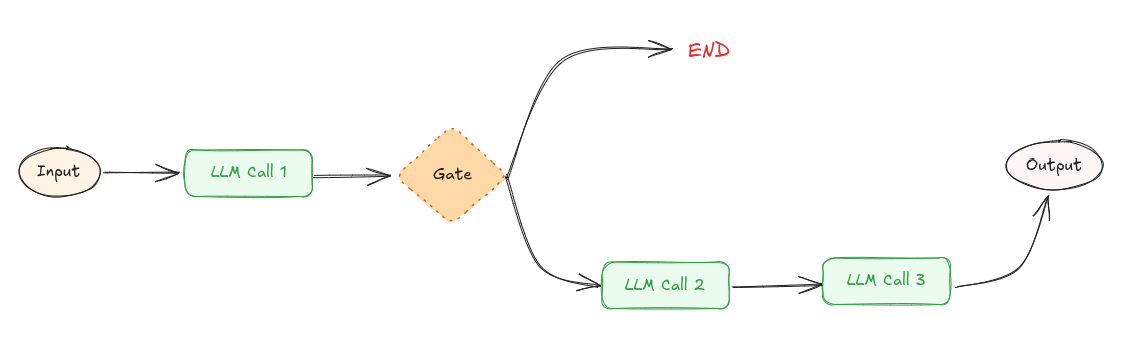 Prompt chaining workflow
Prompt Chaining offers several advantages:
-
Improved Accuracy: The main advantage of the chaining prompts is that it allows iterative refinements, improving accuracy of the final output. However the downside of this workflow is latency. It trade offs latency for higher accuracy.
-
Scalability: Chaining prompts allow generation of long or detailed content by breaking down into smaller, and manageable parts.
Why Prompt Chaining Matters
This approach ensures each step has a focused responsibility, making the system more reliable and debuggable than a single monolithic prompt.
Examples where prompt chaining can be useful:
- Content Creation: Generating detailed articles, stories, or scripts by chaining related prompts.
- Language Translation: Translating text across multiple languages using a chain of prompts to ensure accuracy and fluency.
Context Engineering
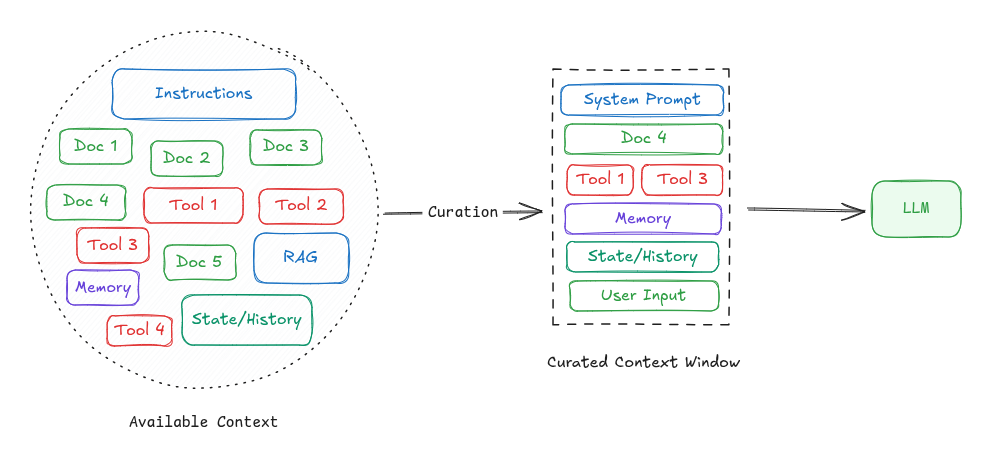
LLMs are stateless, meaning they don’t retain memory of past interactions between calls. To get best results, we must provide an optimized context during each interaction.
Context refers to everything sent to the model in the prompt and can include:
- Instructions (what the model is supposed to do)
- User input or questions
- External data (RAG)
- State or history (e.g., tool calls, results from previous tool calls or prior messages in a conversation)
- Expected output structure (e.g., response format, schema, or constraints)
Context engineering is the process of curating, structuring, and managing the input (context window) provided to a language model in order to maximize its performance on a given task.
LangGraph
In this article, we’ll use LangGraph to build an intelligent email responder.
But what exactly is LangGraph?
LangGraph is an open-source AI agent framework, for building, deploying, and managing complex AI Agentic systems. It’s a low-level framework for building stateful, long-running, multi-actor agents and workflows.
Before we begin the implementation, let’s first understand the core concepts behind LangGraph.
Core Concepts of LangGraph
LangGraph is build on the concept of graph. In LangGraph, you build a graph, instead of linear chains (LangChain). This makes LangGraph better for complex workflows eg: loops, branching, retries, multi-agent coordination
Following are the core concepts in LangGraph:
-
State:
- Unlike LangChain’s memory, LangGraph uses a state object that is passed and updated as nodes run.
- A state is a dictionary (
TypedDict) of all variables your workflow needs. Its a data structure/context passed between steps. - Example:
class State(TypedDict):
  question: str
  classification: str | None
  answer: str | None
-
Nodes:
- A node is a function that takes in state and returns the updates
- Nodes can call LLMs, APIs, or some logic
- Example:
def classify_node(state):
    q = state["question"]
    if "hello" in q.lower():
        return {"classification": "greeting"}
    return {"classification": "question"}
-
Edges:
- Edges connect nodes
- They can be fixed (always go A → B) or conditional (branch depending on state)
- LangGraph supports Control Flow:
- Branching: if condition X, go to Node ‘A’; else, go to Node ‘B’
- Loops: repeat until condition met (retry, re-ask user, refine)
- Parallel: run multiple nodes on a list and merge (map-reduce)
-
Tools:
- Tool is a function or action that your agents can use to get something done like calling an API, doing a calculation, searching a database, or accessing a file.
- Think of tools as skills or abilities that you give your agent.
-
Durable execution & Checkpointing:
- LangGraph can pause and resume workflows
- Useful for long-running agents or workflows with human approval
-
StateGraph:
- A graph that connects nodes and edges together
- A StateGraph is a flowchart of steps (nodes) your AI agent goes through to complete a task
Setting up LangGraph
This section will guide you through the process of installing and configuring LangGraph in your development environment.
-
First ensure that
Python 3.12or later is installed on your machine -
Create a Virtual Environment
python -m venv . source langgraph_env/bin/activate -
Install LangGraph dependencies
pip install langgraph python-dotenv
pip install langchain-openai   # integration package
Set environment variable
OPENAI_API_KEY.export OPENAI_API_KEY="your-api-key" -
Verify Installation
import langgraph

print(langgraph.__version__)
Implementation: Building Email Assistant Step by Step
Now that we understand the core concepts, let’s start building AI Email Assistant using LangGraph. We’ll model the email response process as a structured pipeline where each step builds upon the previous one.
Defining Processing Pipeline
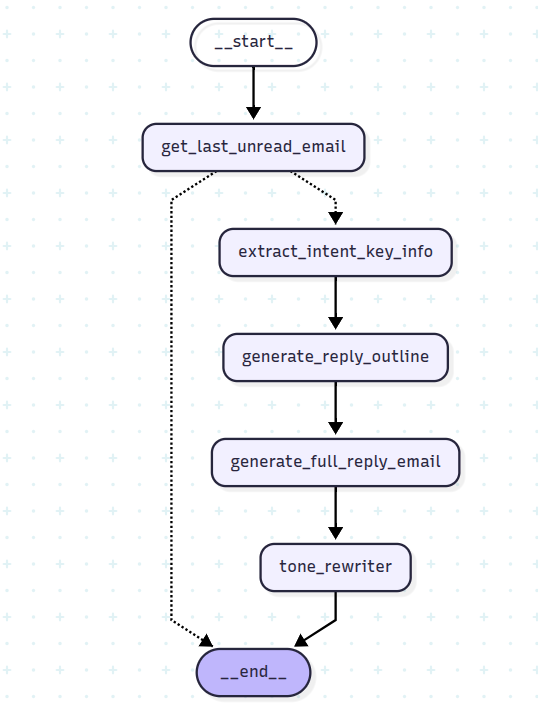
Our AI assistant will transform incoming emails into thoughtful responses through four distinct stages:
- Input: Raw email text
- Step 1: Extract key information and intent
- Step 2: Generate a structured response outline
- Step 3: Draft the complete email body
- Step 4: Apply tone transformation (professional, friendly, casual, etc.)
- Output: Polished, context-aware email response
The chain will look like following
Chain:
- Prompt 1 → “Extract intent and key info from incoming email”
- Prompt 2 → “Generate a response outline”
- Prompt 3 → “Draft complete email body”
- Prompt 4 (Optional) → “Apply tone transformation (professional, friendly, casual, etc.)”
Implementation
-
Lets first define the tools and the model
load_dotenv()

@tool
def last_unread_email() -> str:
    # your logic to retrieve last unread email
    return """
    From: adam@example.com
    Date: 2024, Dec 12 14:00
    Subject: Bulk Order Inquiry

    Hi Neha,

    I’m reaching out to inquire about the availability of your product in bulk.
    We are looking to order around 500 units and would like to know the pricing and delivery timeline.
    Please get back to me by the end of the week.

    Best Regards,
    Adam Willson
    """

tools = [last_unread_email]
tools_by_name = {tool.name: tool for tool in tools}
llm = init_chat_model(model=os.getenv("MODEL_NAME"), model_provider=os.getenv("MODEL_PROVIDER"), temperature=0)
Make sure to add .env file with two variables:
MODEL_PROVIDER=<model-provider> MODEL_NAME=<model-name> -
Next, we define the state, which will consist of five fields:
**email_text**: Represents the raw incoming email content.**extraction**: A structured model that extracts the email’s intent, tone, questions, and urgency.**reply_outline**: A preliminary outline for drafting a response.**full_email**: The body of the drafted response.**final_polished_email**: The polished version of the email ready for sending.
At each stage of processing, the state will be used and updated by the nodes.
class EmailIntentExtraction(BaseModel): intent: str questions: list[str] tone: str urgency: str @classmethod def empty(cls) -> "EmailIntentExtraction": return EmailIntentExtraction(intent="", questions=[], tone="", urgency="") class State(TypedDict): email_text: str extraction: EmailIntentExtraction reply_outline: str full_email: str final_polished_email: str -
The next step is to define the nodes, which can be call to LLM (Large Language Model), external APIs, or custom logic.
def get_last_unread_email(state: State) -> dict[str, Any]: llm_with_tools = llm.bind_tools(tools) message = llm_with_tools.invoke( [ SystemMessage(content="You are a helpful assistant that can get unread emails."), HumanMessage(content="Get last unread mail from inbox"), ] ) # unnecessary: message is of type BaseMessage if not isinstance(message, AIMessage): return {} result = [] if message.tool_calls: for tool_call in message.tool_calls: tool = tools_by_name[tool_call["name"]] tool_result = tool.invoke(tool_call["args"]) result.append(tool_result) else: result.append(message.content) return {"email_text": "\n".join(result)} def extract_intent_key_info(state: State) -> dict[str, Any]: extraction_prompt = f""" Extract the following information from the email below: 1. Sender's intent 2. Specific questions or requests 3. Tone of the email 4. Urgency or deadline Email: \"\"\" {state["email_text"]} \"\"\" Respond in JSON format. """ llm_with_structured_output = llm.with_structured_output(EmailIntentExtraction) message = llm_with_structured_output.invoke( [ SystemMessage(content="You are a helpful assistant that extracts structured data from emails."), HumanMessage(content=extraction_prompt), ] ) return {"extraction": message} def generate_reply_outline(state: State) -> dict[str, Any]: extracted_info: EmailIntentExtraction = state["extraction"] outline_prompt = f""" You are an email assistant. Based on the following extracted info, generate a structured email **outline** with these parts: 1. Greeting 2. Acknowledgment of the sender's intent 3. Answers to questions or information needed 4. Next steps or follow-up 5. Closing Make sure the tone is {extracted_info.tone} and mention that a response will be sent before {extracted_info.urgency.lower()}. Extracted Info: {extracted_info.model_dump_json()} """ message = llm.invoke( [ SystemMessage( content="You are a helpful assistant that generates email outlines based on extracted intent." ), HumanMessage(content=outline_prompt), ] ) return {"reply_outline": message.content} def generate_full_reply_email(state: State) -> dict[str, Any]: email_outline = state["reply_outline"] compose_prompt = f""" Using the following email outline, write a professional and polite email reply. Format it as a formal business email. Keep the tone professional. Outline: {email_outline} """ message = llm.invoke( [ SystemMessage(content="You are an AI that writes professional business emails based on outlines."), HumanMessage(content=compose_prompt), ] ) return {"full_email": message.content} def __get_rewrite_prompt(email_text: str, tone: Literal["friendly", "formal", "casual", "firm"]): return f""" Rewrite the following email in a more **{tone}** tone. Keep all the original information intact, but adapt the language to fit the new tone. Email: \"\"\" {email_text} \"\"\" """ def tone_rewriter(state: State) -> dict[str, Any]: full_email = state["full_email"] prompt = __get_rewrite_prompt(full_email, "formal") message = llm.invoke( [ SystemMessage( content=( "You are an assistant that rewrites emails in different tones while keeping the original meaning." ) ), HumanMessage(content=prompt), ] ) return {"final_polished_email": message.content} -
Next, define the logic to determine whether to end the process (Conditional Gate). For example, you can check if the email contains at least 100 characters. You can also customize this logic to suit your specific requirements.
def validate_incoming_email(state: State) -> str: if len(state["email_text"].strip()) >= 100: return "extract_intent_key_info" return END -
Build workflow
# Build workflow workflow = StateGraph(State) # Add nodes workflow.add_node("get_last_unread_email", get_last_unread_email) workflow.add_node("extract_intent_key_info", extract_intent_key_info) workflow.add_node("generate_reply_outline", generate_reply_outline) workflow.add_node("generate_full_reply_email", generate_full_reply_email) workflow.add_node("tone_rewriter", tone_rewriter) # Add edges to connect nodes workflow.add_edge(START, "get_last_unread_email") workflow.add_conditional_edges("get_last_unread_email", validate_incoming_email, ["extract_intent_key_info", END]) workflow.add_edge("extract_intent_key_info", "generate_reply_outline") workflow.add_edge("generate_reply_outline", "generate_full_reply_email") workflow.add_edge("generate_full_reply_email", "tone_rewriter") workflow.add_edge("tone_rewriter", END) chain = workflow.compile() -
Invoke the workflow
initial_state = { "email_text": "", "extraction": EmailIntentExtraction.empty(), "reply_outline": "", "full_email": "", "final_polished_email": "", } messages = chain.invoke(initial_state) for key in messages: print(f"{key}: ") print(messages[key]) print("---------------------------------------------") -
Test
# Input emails
input_email = """
From: adam@example.com
Date: 2024, Dec 12 14:00
Subject: Bulk Order Inquiry

Hi Neha,

I’m reaching out to inquire about the availability of your product in bulk.
We are looking to order around 500 units and would like to know the pricing and delivery timeline.
Please get back to me by the end of the week.

Best Regards,
Adam Willson
"""
Response (tone “formal”)
extraction:
intent='Inquiring about bulk order' questions=['What is the pricing for 500 units?', 'What is the delivery timeline for 500 units?'] tone='Professional' urgency='End of the week'

---------------------------------------------

reply_outline:
Here is an email outline based on the information provided:

**Subject: Re: Bulk Order Inquiry - 500 Units**

1.  **Greeting**
    *   Dear [Sender Name],

2.  **Acknowledgment of Sender's Intent**
    *   Thank you for reaching out to us regarding your interest in a bulk order. We appreciate you considering our products.
    *   We understand you are specifically inquiring about the pricing and delivery timeline for 500 units.

3.  **Answers to Questions / Information Needed**
    *   We are currently compiling the detailed information regarding the pricing structure for 500 units and the estimated delivery timeline.
    *   Please be assured that we will send a comprehensive response addressing both of your questions before the end of the week.

4.  **Next Steps / Follow-up**
    *   We look forward to providing you with the necessary details and assisting you further with your bulk order.
    *   Should you have any additional questions in the meantime, please do not hesitate to contact us.

5.  **Closing**
    *   Sincerely,
    *   [Your Name/Company Name]

---------------------------------------------

full_email:
Subject: Re: Bulk Order Inquiry - 500 Units

Dear [Sender Name],

Thank you for reaching out to us regarding your interest in a bulk order. We appreciate you considering our products and understand you are specifically inquiring about the pricing and delivery timeline for 500 units.

We are currently compiling the detailed information regarding the pricing structure for 500 units and the estimated delivery timeline. Please be assured that we will send a comprehensive response addressing both of your questions before the end of the week.

We look forward to providing you with the necessary details and assisting you further with your bulk order. Should you have any additional questions in the meantime, please do not hesitate to contact us.

Sincerely,

[Your Name/Company Name]

---------------------------------------------

final_polished_email:
Subject: Re: Bulk Order Inquiry - 500 Units

Dear [Sender Name],

We acknowledge receipt of your inquiry regarding a bulk order. We appreciate your interest in our products and note your specific request concerning the pricing and estimated delivery timeline for 500 units.

We are currently in the process of compiling the comprehensive details pertaining to the pricing structure for 500 units and the projected delivery schedule. Please be advised that a comprehensive response addressing both of your inquiries will be dispatched prior to the close of this week.

We anticipate furnishing you with the requisite details and offering further assistance with your bulk order. Should you require any additional information or have further questions in the interim, please do not hesitate to contact us.

Sincerely,

[Your Name/Company Name]
---------------------------------------------
Conclusion
In this article, we’ve built a sophisticated AI Email Assistant that demonstrates the power of modern LLM orchestration. By decomposing the complex task of email response into manageable steps using Prompt Chaining, we created a system that is more reliable, and effective than a single monolithic prompt.
This approach doesn’t just apply to email assistants, the same pattern can be applied to countless other AI applications, from customer support systems to content generation pipelines.